Showing posts with label Groovy & Grails. Show all posts

Creating Simple Audit Log using grails, Spring Security Listeners, Hibernate Listeners


Simple Audit Log using Grails and Hibernate event listeners
Providing following functionality 1. Loging Insert, Update, Delete of objects 2. Logging Login, Logout events 3. Logging Login Attempt failed event 4. Logging which screen is accessed 1. Create AuditLog domain.
class AuditLog {
    static transient escapeLogAction = true

    User user
    AuditLogType auditLogType // To find which type of action it is. like login, logout, screen access etc
    String value
    Date timeStamp
    String IPAddress
    Date dateCreated
    Date lastUpdated
    AuditLogSource source // To find what is the source of request. like web or system. Some times we run the cron jobs to insert the data. in that case it is "System"

    static constraints = {
        user (nullable: true)
        IPAddress (nullable: true)
        source (nullable: true)
    }
}

2. Create AuditLogType enum in src/groovy folder
enum AuditLogType {
    LOG_IN,
    LOG_OUT,
    FAILED_ATTEMPT,
    SCREEN_ACCESS,
    DATA_CHANGE
}

4. Create AuditLogSource enum in src/groovy folder
enum AuditLogSource {
   WEB,
   SYSTEM
}

3. Create AuditLogListener(src/groovy folder) to log insert/update/delete actions )
import org.hibernate.event.PostDeleteEvent
import org.hibernate.event.PostDeleteEventListener
import org.hibernate.event.PostInsertEvent
import org.hibernate.event.PostInsertEventListener
import org.hibernate.event.PostUpdateEvent
import org.hibernate.event.PostUpdateEventListener
import org.springframework.web.context.request.NativeWebRequest
import org.springframework.web.context.request.RequestAttributes
import org.springframework.web.context.request.RequestContextHolder

import javax.servlet.http.HttpServletRequest
import javax.servlet.http.HttpSession

class AuditLogListener implements PostInsertEventListener, PostUpdateEventListener, PostDeleteEventListener {

    def springSecurityService

    @Override
    void onPostDelete(PostDeleteEvent postDeleteEvent) {
        logAction(postDeleteEvent.entity)
    }

    @Override
    void onPostInsert(PostInsertEvent postInsertEvent) {
        logAction(postInsertEvent.entity)
    }

    @Override
    void onPostUpdate(PostUpdateEvent postUpdateEvent) {
        logAction(postUpdateEvent.entity)
    }

    private void logAction(Object entity) {
 
  //declaring escapeAuditLog = true in a domain will skip the audit log for that domain.
        if (entity.metaClass.hasProperty(entity,'escapeAuditLog') && entity.'escapeAuditLog') {
            return
        }
        HttpServletRequest request = getHttpServletRequest()
        HttpSession session = request?.getSession()
        AuditLog auditLog = new AuditLog()
        auditLog.timeStamp = new Date()
        auditLog.actionType = ActionType.DATA_CHANGE
        auditLog.user = springSecurityService.currentUser
        auditLog.value = entity.getClass().getName()
        auditLog.IPAddress = getRemoteAddress(request)
        auditLog.source = request ? AuditLogSource.WEB : AuditLogSource.SYSTEM
        auditLog.withNewSession {
            auditLog.save(flush: true)
        }
    }

    private HttpServletRequest getHttpServletRequest() {
        RequestAttributes attribs = RequestContextHolder.getRequestAttributes()
        if (attribs instanceof NativeWebRequest) {
            HttpServletRequest request = (HttpServletRequest) ((NativeWebRequest) attribs).getNativeRequest()
            return request
        }
    }
 
 private String getRemoteAddress(HttpServletRequest request) {
        if (!request) return null
        String ipAddress = request.getHeader("X-Forwarded-For")  // X-Forwarded-For: clientIpAddress, proxy1, proxy2
        if (!ipAddress) {
            ipAddress = request.remoteAddr
        }
        return ipAddress.split(",")[0]
    }
}
5. Create LoggingSecurityEventListener(in src/groovy folder) to log the Login, Logout events
import org.apache.log4j.Logger
import org.springframework.beans.factory.annotation.Autowired
import org.springframework.context.ApplicationListener
import org.springframework.security.authentication.event.AuthenticationSuccessEvent
import org.springframework.security.core.Authentication
import org.springframework.security.web.authentication.logout.LogoutHandler

import javax.servlet.http.HttpServletRequest
import javax.servlet.http.HttpServletResponse

class LoggingSecurityEventListener implements ApplicationListener, LogoutHandler {
    private static final log = Logger.getLogger(this)
    def userService

    @Autowired
    HttpServletRequest httpServletRequest // Injected and limited to the current thread per usage

    void onApplicationEvent(AuthenticationSuccessEvent event) {
        event.authentication.with {
            def userName = principal.hasProperty('username')?.getProperty(principal) ?: principal
            log.info("Login success from ${getRemoteAddress(httpServletRequest)} using username $userName")
            logAction(userName, ActionType.LOG_IN, getRemoteAddress(httpServletRequest))
        }
    }

    void logout(HttpServletRequest request, HttpServletResponse response, Authentication authentication) {
        authentication?.with {
            def username = principal.hasProperty('username')?.getProperty(principal) ?: principal
            logAction(username, ActionType.LOG_OUT, getRemoteAddress(request))
        }
    }

    private void logAction(def userName, ActionType actionType, String ipAddress) {
        AuditLog auditLog = new AuditLog()
        auditLog.source = ActionLogSource.WEB
        auditLog.actionType = actionType
        auditLog.value = userName
        auditLog.timeStamp = new Date()
        auditLog.user = User.findByUserName(userName) // modify to get the logged in user
        auditLog.IPAddress = ipAddress
        auditLog.save(flush: true)
    }
 
 private String getRemoteAddress(HttpServletRequest request) {
        if (!request) return null
        String ipAddress = request.getHeader("X-Forwarded-For")  // X-Forwarded-For: clientIpAddress, proxy1, proxy2
        if (!ipAddress) {
            ipAddress = request.remoteAddr
        }
        return ipAddress.split(",")[0]
    }
}
6. Create LoginFailedAuthEventListener(in src/groovy folder) to log login failed attempts
import org.apache.log4j.Level
import org.apache.log4j.Logger
import org.springframework.context.ApplicationListener
import org.springframework.security.authentication.event.AbstractAuthenticationFailureEvent

class LoginFailedAuthEventListener implements ApplicationListener {
    private static final log = Logger.getLogger(this)
    def actionLogService

    void onApplicationEvent(AbstractAuthenticationFailureEvent event) {
        log.setLevel(Level.WARN)
        def userName = event.authentication.principal
        log.warn("Failed login attempt from $event.source.details.remoteAddress using username $userName")
        AuditLog auditLog = new AuditLog()
        auditLog.source = ActionLogSource.WEB
        auditLog.actionType = ActionType.FAILED_ATTEMPT
        auditLog.value = userName
        auditLog.timeStamp = new Date()
        auditLog.IPAddress = event.source.details.remoteAddress
        auditLog.save(flush: true)
    }
}
7. Register all these listners in resources.groovy
import AuditLogListener
import LoggingSecurityEventListener
import LoginFailedAuthEventListener
import org.codehaus.groovy.grails.orm.hibernate.HibernateEventListeners

// Place your Spring DSL code here
beans = {
    loginFailedAuthEventListener(LoginFailedAuthEventListener)

    securityEventListener(LoggingSecurityEventListener)

    auditLogListner(AuditLogListener) {
        springSecurityService = ref("springSecurityService")
    }

    hibernateEventListeners(HibernateEventListeners) {
          listenerMap = ['post-insert':auditLogListner,
                         'post-update':auditLogListner,
                         'post-delete':auditLogListner]
    }
}

8. Create BaseController(in controllers folder) to log Screen Access and extend this controller from every controller
class BaseController {
    def springSecurityService

    def beforeInterceptor = {
        if (!request.xhr) {
            AuditLog auditLog = new AuditLog()
            auditLog.source = ActionLogSource.WEB
            auditLog.timeStamp = new Date()
            auditLog.actionType = ActionType.SCREEN_ACCESS
            auditLog.user = User.get(springSecurityService.principal.id)
            auditLog.IPAddress = getRemoteAddress(request)
            auditLog.value = actionUri
            auditLog.save(flush: true)
        }
        return true
    }
 
 private String getRemoteAddress(HttpServletRequest request) {
        if (!request) return null
        String ipAddress = request.getHeader("X-Forwarded-For")  // X-Forwarded-For: clientIpAddress, proxy1, proxy2
        if (!ipAddress) {
            ipAddress = request.remoteAddr
        }
        return ipAddress.split(",")[0]
    }
}

Forgot Password, Change Password, Reset Password functionality using grails


Forgot Password, Change Password, Reset Password functionality using grails
1. Install grails mail plugin. And configure the mail plugin to email reset password link
compile "org.grails.plugins:mail:1.0.7"

2. Create a domain Token.groovy to generate random token to send reset password link to user email
MongoPersistanceListener.groovy>
import java.util.UUID

class Token {
    String email
    String value = UUID.randomUUID().toString().replaceAll('-', '')
    Date dateCreated

    static mapping = {
        version false
    }

    static constraints = {
    }
}
3. Create a UserService.groovy to send send generate token and send email
class UserService {

    def emailService;

 void sendResetPasswordEmail(User user){
        def token = Token.findByEmail(user.email)
        if(!token) {
            token = new Token(email: user.email)
            token.save(flush: true);
        }
        emailService.sendResetPasswordEmail(user, token)
    }

}

3. Create a EmailService.groovy to send email
import grails.plugin.asyncmail.AsynchronousMailService
import grails.plugin.mail.MailService

class EmailService {

    MailService mailService
    def groovyPageRenderer
    def grailsApplication

 /**
  * Sends the email to given email id
  */
    def sendMail(MailDTO mailDTO) {

        log.info "Sending Mail To ==== ${mailDTO?.toMailId}"

        mailService.sendMail {
            async true
            to mailDTO?.toMailId
            subject mailDTO.subject
            html mailDTO.content
        }
    }

 
 /*
     * Sends the reset password email
     */
    def sendResetPasswordEmail(User user, Token token) {
        MailDTO mailDTO = new MailDTO()
        mailDTO.with {
            toMailId = user?.email
            subject = "Password reset on Mobile Career Index"
            content = groovyPageRenderer.render(template: '/mail/resetPassword', model: [user: user,token:token])
        }
        sendMail(mailDTO)
    }
}
3. Create MailDTO.groovy in src/groovy folder
class MailDTO {
    String toMailId
    List ccMailIds
    String subject
    String content
}
3. Create UserController.groovy

import org.codehaus.groovy.grails.plugins.springsecurity.SpringSecurityUtils
import grails.plugins.springsecurity.Secured
import org.codehaus.groovy.grails.validation.Validateable

class UserController {

    def userService

    def forgotPassword = {

        requireLogout()

        if (request.get) {
            render view: "/user/forgotPassword"
            return;
        }

        String email = params.email
        if (!email) {
            flash.error = message(code: 'spring.security.forgotPassword.username.missing')
            redirect action: 'forgotPassword'
            return
        }

        def user = User.findByEmail(email);
        if (!user) {
            flash.error = message(code: 'spring.security.forgotPassword.user.notFound')
            redirect action: 'forgotPassword'
            return
        }

        userService.sendResetPasswordEmail(user);
        flash.message = message(code: 'spring.security.forgotPassword.sent')
        render view: "/user/forgotPassword"
    }

 @Secured(['IS_AUTHENTICATED_ANONYMOUSLY'])
    def resetPassword = { ResetPasswordCommand command ->

        requireLogout();
        flash.message = null;
        String tokenValue = params.token

        def token = tokenValue ? Token.findByValue(tokenValue) : null
        if (!token) {
            flash.error = message(code: 'spring.security.resetPassword.badCode')
            redirect controller: "home"
            return
        }

        if (request.get) {
            render view: "/user/resetPassword" , model:[token: token, command: new ResetPasswordCommand()]
            return
        }

        command.email = token.email
        command.validate()

        if (command.hasErrors()) {
            flash.error = message(code: 'spring.security.resetPassword.badCode')
            render view: "/user/resetPassword" , model:[token: token, command: command]
            return
        }

        Token.withTransaction { status ->
            def user = User.findByEmail(token.email);
            user.password = command.password
            user.save(flush: true)
            token.delete(flush: true)  ;
        }

        springSecurityService.reauthenticate token.email

        flash.message = message(code: 'spring.security.resetPassword.success')
        def config = SpringSecurityUtils.securityConfig
        redirect uri: config.successHandler.defaultTargetUrl
        return
    }

    @Secured(['IS_AUTHENTICATED_FULLY'])
    def editPassword = { EditPasswordCommand command ->

        flash.message = null;

        if (request.get) {
            render view: "/user/editPassword" , model:[command: new EditPasswordCommand()]
            return
        }

        command.validate()

        if (command.hasErrors()) {
            render view: "/user/editPassword" , model:[command: command]
            return
        }
        User user = springSecurityService.currentUser;
        String encodedPassword = springSecurityService.encodePassword(command.currentPassword)
        if (encodedPassword != (user.password)) {
            flash.error = message(code: 'command.password.error.invalid')
            render view: "/user/editPassword" , model:[command: new EditPasswordCommand()]
            return;
        }
        user.password = command.password
        user.save(flush: true);

        flash.message = message(code: 'spring.security.resetPassword.success')
        render view: "/user/editPassword" , model:[command: new EditPasswordCommand()]
    }
}

@Validateable
class ResetPasswordCommand {
    String email
    String password
    String password2

    static constraints = {
        email nullable: false, email: true
        password blank: false, nullable: false
        password2 validator: password2Validator
    }

    static final password2Validator = { value, command ->
        if (command.password != command.password2) {
            return 'command.password2.error.mismatch'
        }
    }
}

@Validateable
class EditPasswordCommand {

    String currentPassword
    String password
    String password2

    static constraints = {
        currentPassword blank: false, nullable: false
        password blank: false, nullable: false
        password2 validator: password2Validator
    }

    static final password2Validator = { value, command ->
        if (command.password != command.password2) {
            return 'command.password2.error.mismatch'
        }
    }
}

I have used parsley.js to validate the forms Create forgotPassword.gsp in views/user folder


    Forgot Password


Reset Password


Submit
Create resetPassword.gsp in views/user folder


    Reset Password


Reset Password


Submit
Create editPassword.gsp in views/user folder


    Change Password


Change Password


Cancel Update

Custom Persistence Listener in Mongodb Grails plugin


Mongodb grails persistance listeners to assign default properties
Mongodb doesn't support extending the base class to assign values to common properties like updatedOn, createdOn etc.
Hibernate has support to extend the class to a domain and assign the properties. In grails mongodb we can acheive this using Grails persistance listeners.
1. Install mongodb plugin in grails (BuildConfig.groovy).
compile "org.grails.plugins:mongodb:5.0.7.RELEASE"

2. Now Create Perstitance Listener by extending AbstractPersistenceEventListener in src/groovy. AbstractPersistenceEventListener will provide onPersistenceEvent and we can capture PreInsert, PreUpdate ... events
MongoPersistanceListener.groovy>
import org.grails.datastore.mapping.core.Datastore
import org.grails.datastore.mapping.engine.event.AbstractPersistenceEvent
import org.grails.datastore.mapping.engine.event.AbstractPersistenceEventListener
import org.grails.datastore.mapping.engine.event.PreDeleteEvent
import org.springframework.context.ApplicationEvent

import org.grails.datastore.mapping.engine.event.EventType

class MongoPersistanceListener extends AbstractPersistenceEventListener  {

    def springSecurityService

    public MongoPersistanceListener(final Datastore datastore, def springSecurityService) {
        super(datastore)
        this.springSecurityService = springSecurityService
    }
    @Override
    protected void onPersistenceEvent(final AbstractPersistenceEvent event) {
        def entity = event.entityObject
        switch(event.eventType) {
            case EventType.PreInsert:
                initDefaults(entity)
                break
            case EventType.PostInsert:
                break
            case EventType.PreUpdate:
                def currentUser = springSecurityService.getCurrentUser()
                event.entityObject.updatedBy = currentUser ? currentUser.id : 0;
                event.entityObject.updatedOn = new Date();
                break;
            case EventType.PostUpdate:
                break;
            case PreDeleteEvent:
                break;
            case EventType.PostDelete:
                break;
            case EventType.PreLoad:
                break;
            case EventType.PostLoad:
                break;
            case EventType.Validation:
                initDefaults(entity)
                break;
        }
    }

    @Override
    public boolean supportsEventType(Class eventType) {
        return true
    }

    void initDefaults(entity) {
        def currentUser = springSecurityService.getCurrentUser()
        if (entity.createdBy == null) {
            entity.createdBy = currentUser? currentUser.id : 0;
        }
        if (entity.createdOn == null) {
            entity.createdOn = new Date();
        }
        if (entity.updatedBy == null) {
            entity.updatedBy = currentUser? currentUser.id : 0;
        }
        if (entity.updatedOn == null) {
            entity.updatedOn = new Date();
        }
    }
}

3. Register this listener in Bootstrap.groovy init method
class BootStrap {

 def springSecurityService

    def init = { servletContext ->
        def ctx = Holders.grailsApplication.mainContext
        ctx.getBeansOfType(Datastore).values().each { Datastore d ->
            ctx.addApplicationListener( new MongoPersistanceListener(d, springSecurityService))
        }
    }
    def destroy = {
    }
}
This listener will be invoked when database event is triggered.

Hosting grails application in openshift

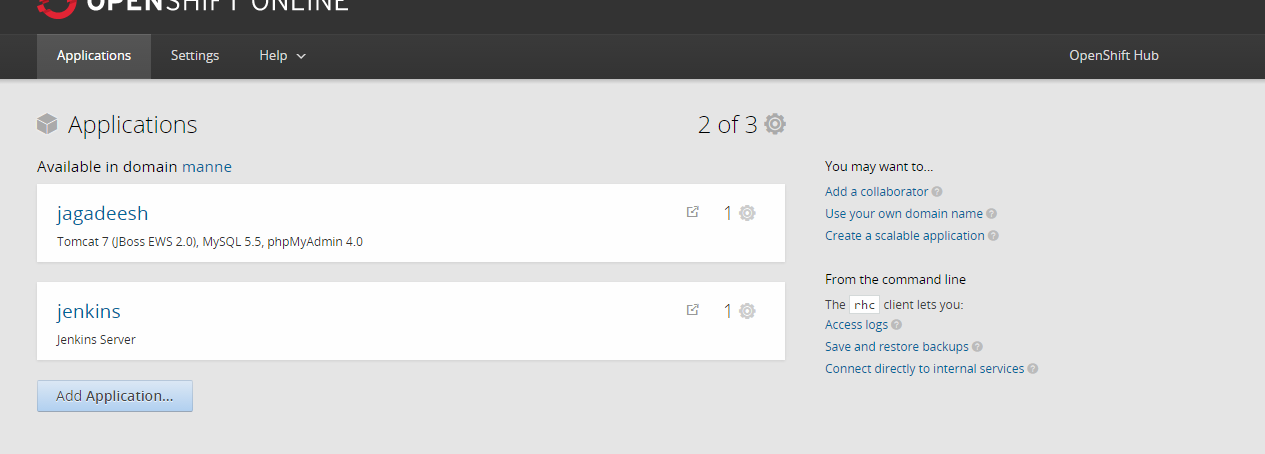
Hosting a grails application on free hosting provider (openshift) 1. Create account in https://www.openshift.com/ 2. Login to openshift web console 3. click on add application
4. Select Tomcat 7 (JBoss EWS 2.0) from the list of applications
5. Enter public url and select other configuration and create application. Leave blank in git hub url.
6. Go to applications page -> go to the application that you have created -> add mysql to the application.
7. Click on add Cartridge
8. Now add phpmyadmin catridge to the application by selecting clicking on phpmyadmin
9. Database Setup : Go to the application details page and find database username and password in mysql section
10. Launch phpmyadmin by using the mysql usernamd and password provided in the application details page to add or modify database and mysql users.
11. Note the server ip address to configure our grails application with mysql database
12. Login to SSH by reading instructions on https://developers.openshift.com/managing-your-applications/remote-connection.html
Make sure to add your public key in openshift account settings.  13. Generate war file for grails application using war command.
 14. Download https://winscp.net/eng/download.php and connect to ssh to upload war file. 13. Upload war file to the path app-root/runtime/dependencies/jbossews/webapps using WinSCP 14. Now we need to restart the tomcat server from ssh. After connecting to ssh run the command "gear start --cart jbossews-2.0"
 15. Now the grails application will be running on openshift server that any one can access

Grails Spock Testing Where Block Passing Dynamic Objects


Grails Spock testing passing dynamic objects in where block
To fix "Only @Shared and static fields may be accessed from here" issue in spock integration test with where block we need to use @Shared annotation while declaring variables and need to initialize them in setupSpec() method
Sample implementation
@TestMixin(IntegrationTestMixin)
class SpockExampleIntegrationTests  extends Specification {
    @Shared String email1
    @Shared String email2
 
    void setup() {
          email1 = "mannejkumar@gmail.com"
          email2 = "jk.manne@yahoo.com"
    }
 
    def testGetEmployeeById() {
  
        setup:
        Employee employee
  
        when:
        employee = employeeService.getEmployeeById(employeeId)

        then:
        employee.email == result

        where:
        sno |   employeeId     |     result     
        1   |   1              |     email1
        2   |   2              |     email2
   }
}

Adding properties to domain classes on the fly using groovy propertyMissing feature


Adding properties to domain classes on the fly using groovy propertyMissing feature
Some times we need to add properties to domain classes on the fly.
Groovy supports propertyMissing for dealing with property resolution attempts. Steps to added dynamic properties to domain classes.
1. Create Entity.groovy class in src/groovy folder and use groovy propertyMissing feature in Entity class
class Entity {
   def dynamicProperties= [:]
   //setter
   def propertyMissing(String name, value) { dynamicProperties= [name] = value }
   //getter
   def propertyMissing(String name) { dynamicProperties= [name] }
}

2. Now extend Entity class from your domain class
User.groovy>
class User extends Entity{
   String firstName
   String lastName
   
}
Address.groovy
class Address extends Entity{
   String country   
}

3. Testing the dynamic properties
class DynamicPropertyTester {

   static void main(String[] args) {

 User user = new User();
        user.firstName = "Jagadeesh";
        user.lastName = "Manne";
        user.name = "$user.firstName $user.lastName"; //adding dynamic property "name" that doesnt exist in User domain
        println "Name : $user.name"; 
        //out put 
        //Name : Jagadeesh Manne
        
        Address address = new Address();
        address.country = "India";
        address.state = "AP";      //dynamic property
        address.city = "Vijayawada"; // dynamic property
        println "Country : $address.country, State : $address.state, City: $address.city" 
        //out put
        // Country : India, State : AP, City: Vijayawada
 
   }
   
}

checking the website is responsive or not using selenium and groovy, grails and java


checking the website is responsive or not using selenium and groovy, grails and java
Here i am providing the way to find the given website is responsive or not using selnium and grails. We can acheive this in multiple ways
1. Screenshot comparison : Using selenium webdriver go to the given website url and change the browser to different sizes and compare the screenshots.If both screenshots are same then the given website is not responsive.If both screenshots are different then given website is responsive. This method is not good because Lets assume if slideshows are present in given website while taking the screenshots of that website, the slideshow images present in the given website may change and we will get different screenshots so if we compare the screenshots we will get result as both screenshots are different and we may get response as the given site is responsive

2. The document width : Using selenium webdriver go to the given website url and change the browser to mobile device size and execute the javascript to get document width. If width is less than mobile devices maximum width we can assume that the given website is responsive

3. Screenshot width : Using selenium webdriver go to the given website url and change the browser to mobile device size and take the screenshot and get the width of the screenshot image. If width is less than mobile devices maximum width we can assume that the given website is responsive. I tested multiple sites with this approach and got the expected result Steps to check given site is responsive or not

1. Add selenium dependencies in BuildConig.groovy
compile 'org.seleniumhq.selenium:selenium-support:2.15.0'
compile 'org.seleniumhq.selenium:selenium-htmlunit-driver:2.25.0'
runtime('org.seleniumhq.selenium:selenium-java:2.29.1'){
 excludes "selenium-htmlunit-driver"
}

2. Create firefoxprofile
 DesiredCapabilities capabilities = new DesiredCapabilities("firefox", "3.6.", Platform.LINUX);
 FirefoxProfile profile = new FirefoxProfile();

3. Create Remote Web Driver by specifying selenium server url
driver = new RemoteWebDriver(new java.net.URL("http://127.0.0.1:4444//wd/hub"), capabilities);

4. Set the window size to mobile device size
driver.manage().window().setSize(new Dimension(320, 480))

5. Open the url
 driver.get(urlString)

6. Method 1 : Take the Screenshot and get the width of the screenshot. RemoteDriver doesnt implement the TAkeScreenShot class. If the driver does have the Capabilities to take a screenshot.Then Augmenter will add the TakesScreenshot methods to the instance
File screenShot = ((TakesScreenshot) driver).getScreenshotAs(OutputType.FILE);
BufferedImage bufferedImage = ImageIO.read(screenShot);
int width = bufferedImage?.width

Method 2 : Execute the javascript and get the document width
 JavascriptExecutor js = (JavascriptExecutor)driver;
 int width = js.executeScript("return \$(document).width()")

7. Compare the width with mobile device maximum width
//Asuming mobile device width is 480
boolean isResponsive = (width <= 480)

8. run the selenium server
 java -jar seleniumserver.jar
Getting all together in one groovy class called MobileUtils.groovy. Make sure that you have given valid url otherwise validate the given url and show the error message if the given url is invalid
class MobileUtils {
 import org.openqa.selenium.Platform
 import org.openqa.selenium.WebDriver
 import org.openqa.selenium.firefox.FirefoxDriver
 import org.openqa.selenium.firefox.FirefoxProfile
 import org.openqa.selenium.remote.DesiredCapabilities
 import org.openqa.selenium.remote.RemoteWebDriver
 import org.openqa.selenium.remote.Augmenter
 import org.openqa.selenium.Dimension
 import org.openqa.selenium.TakesScreenshot
 import org.openqa.selenium.OutputType
 import org.openqa.selenium.io.TemporaryFilesystem
 import java.awt.image.BufferedImage
 import javax.imageio.ImageIO

 //by taking screenshot and comparing width
 boolean isResponsiveByJs(String url) {
  WebDriver driver = null
  boolean isResponsive = false
  try {
   DesiredCapabilities capabilities = 
   new DesiredCapabilities("firefox", "3.6.", Platform.LINUX);
   FirefoxProfile profile = new FirefoxProfile();
   capabilities.setCapability(FirefoxDriver.PROFILE, profile);
   driver = 
 new RemoteWebDriver(new java.net.URL("http://127.0.0.1:4444//wd/hub"), capabilities);
   driver = new Augmenter().augment(driver);
   driver.manage().window().setSize(new Dimension(320, 480))
   driver.get(url)
   JavascriptExecutor js = (JavascriptExecutor)driver;
            int width = js.executeScript("return \$(document).width()")
   isResponsive = (bufferedImage?.width <= 480);
  } finally {
      //delete the temporary files created by selenium firefox profile
   TemporaryFilesystem.getDefaultTmpFS().deleteTemporaryFiles()
   driver?.quit()
  }
  return isResponsive
    }
 
 // by executing javascript
 boolean isResponsiveByScreenshot(String url) {
  WebDriver driver = null
  boolean isResponsive = false
  try {
   DesiredCapabilities capabilities = 
   new DesiredCapabilities("firefox", "3.6.", Platform.LINUX);
   FirefoxProfile profile = new FirefoxProfile();
   capabilities.setCapability(FirefoxDriver.PROFILE, profile);
   driver = new RemoteWebDriver(new java.net.URL("http://127.0.0.1:4444//wd/hub"), capabilities);
   driver = new Augmenter().augment(driver);
   driver.manage().window().setSize(new Dimension(320, 480))
   driver.get(url)
   File screenShot = ((TakesScreenshot) driver).getScreenshotAs(OutputType.FILE);
   BufferedImage bufferedImage = ImageIO.read(screenShot);
   int width = bufferedImage.width
   isResponsive = (bufferedImage?.width <= 480);
   
  } finally {
      //delete the temporary files created by selenium firefox profile
   TemporaryFilesystem.getDefaultTmpFS().deleteTemporaryFiles()
   driver?.quit()
  }
  return isResponsive
 }
}
If you have better idea than these methods please let me know in comments.

grails mobile device detection using spring mobile and adding different views for mobile and web


grails mobile device detection using spring mobile and adding different views for mobile and web
Recently i worked on a project that has to generate different views for mobile and tab and web. we can design website as responsive but i have different designs for mobile and web and tablet. so i went through spring mobile plugin for grails. The plugin adds dynamic methods to your controllers to determine what type of client is accessing the app:
isMobile() will be true if the client is a mobile phone.
isTablet() will be true if the client is a tablet.
isNormal() will be true if the client is not a mobile phone or tablet.
Additionally, you can run code conditionally, with access to the current org.springframework.mobile.device.Device instance, with this method:
withMobileDevice(Closure closure)
def list() {
   def view = "list"
   withMobileDevice { device ->
      view = "mobileList"
   }
   render(view: view, model: [list: listInstance])
}
But we don't have withTabletDevice closure to generate views for tablets device.
for small application it is okay to use this closure to generate views. What about if we have many controllers with many actions?
Here is the way to implement single place to handle device specific views.

1. Install grails spring mobile plugin
2. Create A BaseController
class BaseController {

 String prefix = "/web";
 
 def beforeInterceptor = {
  if(isMobile()){
   prefix = "/mobile"
  } else if(isTablet()){
   prefix = "/tablet"
  }
 }
 
 def afterInterceptor = { model, modelAndView ->
  if(modelAndView) {
   modelAndView.viewName = prefix + modelAndView.viewName
  }
 }
}
beforeInterceptor : Allows the interception of an action before it is executed. A beforeInterceptor can optionally halt execution of the action.

afterInterceptor : Allows interception of actions after they have executed, but before the view is rendered.

3.Extend the basecontroller
class UserController extends BaseController{

       def list() {
       render(view: view, model: [list: listInstance])
   }
}
4.create device specific views under views folder
   views
       -> mobile
           ->mobileviews
       -> tablet
           ->tabletviews
       -> web
           ->webviews
Thats it. Now check your application in different devices

could not parse date unparseable date grails domain save


could not parse date unparseable date grails domain save
I ran into a little problem with Grails and validation today. I was parsing a date from a web post and kept getting a validation error.
My original code was as follows:
def job = new Job(params)
if (params?.expiryDate) {
    job.expiryDate = new Date().parse("MM/dd/yyyy", params.expiryDate)
} else {
    job.expiryDate = null
}
job.validate()
if (!job.hasErrors()){
    job.save(failOnError:true)
}
When i am trying to save job i am getting validation error "Failed to convert property value of type java.lang.String to required type java.sql.Date for property ; nested exception is java.lang.IllegalArgumentException: Could not parse date: Unparseable date: "
When I got the validation errors, I realized the date format was wrong and tried multiple ways to convert string to date object.
Seemed simple enough. But I kept getting validation errors on the date.
My domain clearly had a Date property, a I was creating a valid date and setting it. Answer nothing was wrong with with the value I parsed and set. Problem was in creating the application object in the first place. This chunk of code:
def job = new Job(params)
is implicitly calling validate and populating the errors object. Even though I was setting a valid value and calling validate later, the errors object had already been set and was not getting cleared.
Solution:
job.clearErrors()
Thats it . It works like a champ now!
Here is the full code :
def job = new Job(params)
job.clearErrors();
if (params?.expiryDate) {
    job.expiryDate = new Date().parse("MM/dd/yyyy", params.expiryDate)
} else {
    job.expiryDate = null
}
job.validate()
if (!job.hasErrors()){
    job.save(failOnError:true)
}
Source : http://jts-blog.com/ (Thanks to JT for saving my time)